Best Korea Weather App for Travelers: KMA Weather & 6-Hour Rain Nowcast
Last verified: October 10, 2026 · Primary source: Korea Meteorological Administration (KMA).
For weather in Korea, start with the country’s official source: the Korea Meteorological Administration (KMA). For travelers, the two most useful tools are Weather Nuri in a browser and the official KMA Weather (기상청 날씨알리미) app.
Why KMA is useful for travelers
International weather apps are fine for a general forecast, but KMA provides Korea-specific radar, warnings and neighborhood forecast data. That is especially useful during summer showers, monsoon periods, typhoons, heavy snow or rapidly changing spring/autumn weather.
Best tool for “Will it rain soon?”
Open KMA Weather Nuri’s map and choose the radar / precipitation forecast layer. KMA’s current map documentation says its precipitation forecast provides predictions in 10-minute intervals for up to 6 hours. This is much more useful for deciding whether to leave a café now or wait an hour than a simple daily rain icon.
How to use the 6-hour precipitation nowcast
- Open KMA Weather Nuri.
- If the map opens in Korean, open the Settings panel.
- Under Language (언어), select English instead of 한국어, then save the setting.
- Select Radar or Precipitation Forecast.
- Move the map to your current area.
- Play or move the time control forward to see how the rain area is expected to move.
How to switch KMA Weather Nuri to English
The KMA Weather Nuri map itself can be displayed in English. On the map, open the settings menu and look for Language (언어). The official settings panel currently provides two choices: 한국어 and English. Choose English and press Save. This is particularly useful for international visitors because you can then navigate the official Korean weather map without translating every menu manually.
Quick path: Weather Nuri → Settings → Language → English → Save.
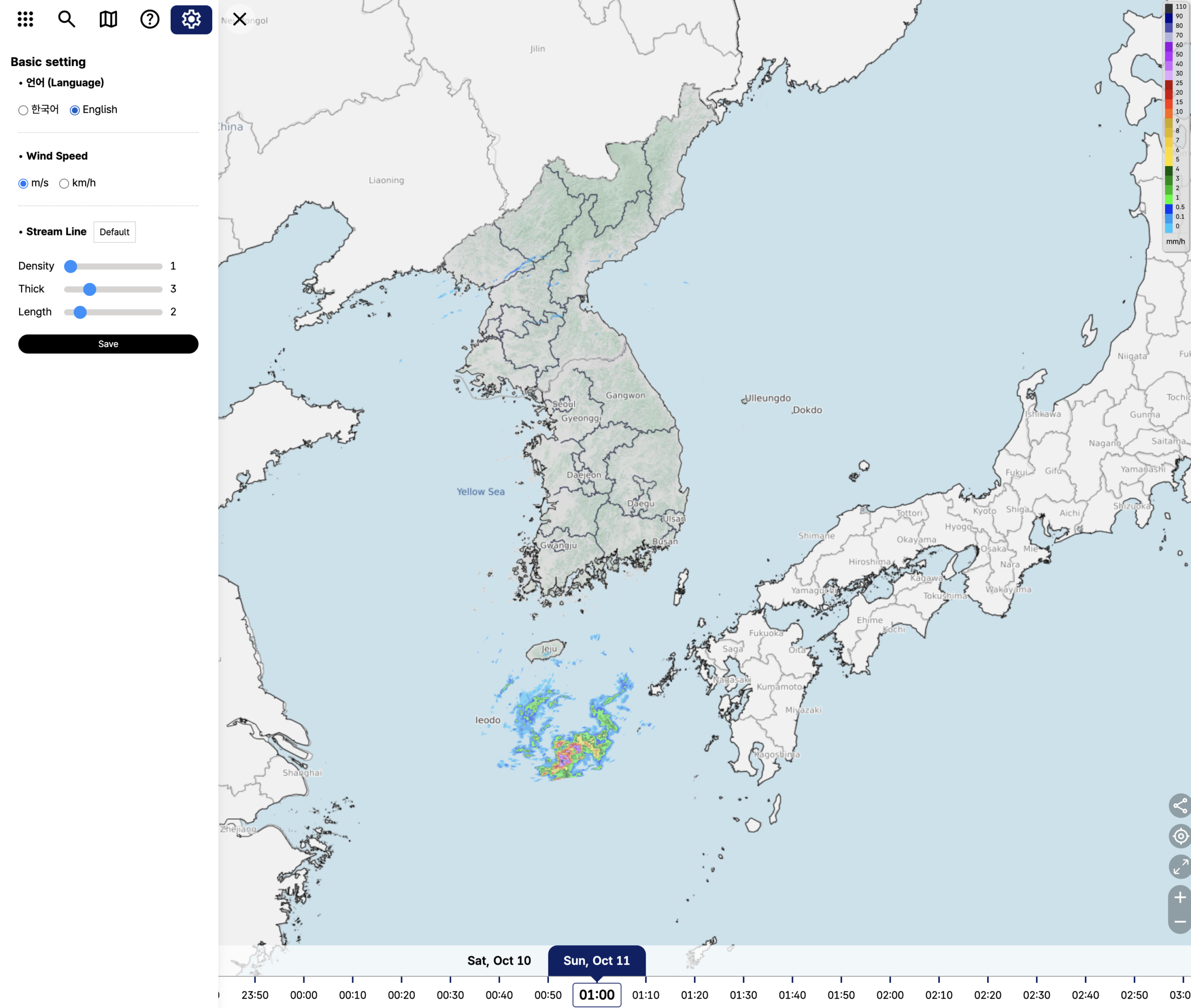
If Weather Nuri first opens in Korean, use Settings → Language → English → Save. After the change, key map labels and controls are displayed in English, which makes the radar and short-term precipitation forecast much easier to use for international visitors.
What does the map show?
The updated KMA map provides radar, satellite, observations, neighborhood forecasts, warnings and impact information. Radar observations are refreshed frequently, and the precipitation prediction layer is designed for the next several hours.
KMA Weather app
The official 기상청 날씨알리미 app provides KMA forecasts and alerts on mobile. KMA’s notices show that the app continues to be actively maintained; version 2.3.0 improvements were announced in late 2025, and new weather-map service notices were posted in September 2026.
Does it cost anything?
No paid subscription is required to use KMA Weather Nuri or the official KMA weather information. Mobile data charges from your SIM or roaming plan can still apply if you are not on Wi-Fi.
Which weather information should a traveler check?
| Situation | Check this |
|---|---|
| Planning tomorrow | Neighborhood forecast |
| Leaving in the next 1–3 hours | Radar + precipitation forecast |
| Outdoor festival / Hangang | Rain, wind and warnings |
| Winter travel | Temperature, snowfall and cold-wave alerts |
| Summer | Rain radar, heat and severe-weather warnings |
Important translation terms
| Korean | English |
|---|---|
| 레이더 | Radar |
| 강수예측 | Precipitation forecast |
| 동네예보 | Local / neighborhood forecast |
| 특보 | Weather warning |
| 강수확률 | Probability of precipitation |
Related guides
Official sources
Featured photo: Red Shuheart / Unsplash. Illustrative only.